
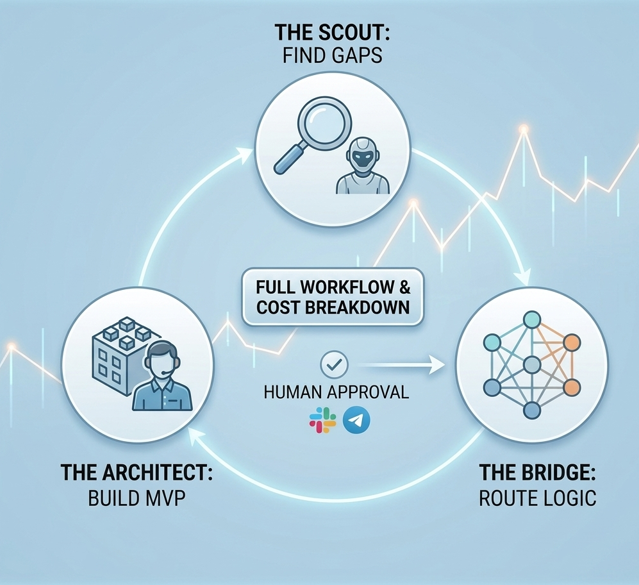
The $1M one-person business isn’t built by simply doing the hard work yourself anymore; it is built by connecting the right logic and setting up autonomous systems. If you have already identified your ideal digital workforce, this comprehensive connect AI agents tutorial will show you exactly how to bridge the gap between market research and technical execution, without forcing you to write a single line of complex integration code.
I remember my early days experimenting with automation back in 2023. Back then, “connecting” tools meant relying on fragile Zapier webhooks that broke every time an API updated. I was constantly babysitting my workflows. Today, in 2026, the game has fundamentally changed. The “silo” model—where you use one AI for writing, another for coding, and manually copy-paste between them—is completely dead. Having a brilliant agent for research and another for coding is utterly useless if you still have to act as the manual bridge between them. Today, we build Autonomous Pipelines.
In this guide, we are going to dive deep into the exact architecture required to make AutoGPT-X (your market researcher) talk directly to Devin 2.0 (your software engineer). By the end of this read, you will have a fully functioning loop.
Why the “Silo” Model Fails in a Ghost Company
Before we jump into the technical configuration, we need to address the elephant in the room: why do most AI setups fail? If you read my previous guide on building your digital workforce / Ghost Company, you know that selecting the right tools is only 20% of the battle. The remaining 80% is orchestration.
When agents operate in silos, they lack context. I learned this the hard way. Last year, I let a research agent run wild to find SaaS pain points. It generated a massive, unstructured 50-page PDF. I then fed that PDF into a coding agent. The result? The coding agent hallucinated entirely, built a product nobody wanted, and burned through $150 in API compute credits in a single afternoon.
Agents need structured, deterministic communication. They need a shared language. This is why learning how to link them properly through frameworks is the most valuable technical skill you can acquire this year.
The Core Tech Stack for Your Autonomous Pipeline
To execute this connect AI agents tutorial successfully, you need to prepare your dashboard. We are going to use a specific, highly optimized tech stack designed for seamless interoperability. Before we dive into the steps, let’s look at the infrastructure of this connect AI agents tutorial and its cost analysis.
Ensure you have active accounts and API access to the following:
- AutoGPT-X (The Scout): This is our frontend agent. We will configure it to operate in “Market Intelligence” mode. Its sole job is to scour the internet, read forums, and identify profitable gaps.
- Devin 2.0 (The Architect): This is our backend executor. Devin is not just a code completion tool; it is an autonomous software engineer. We need to give it “Write Access” to a staging server or a GitHub repository.
- LangGraph Cloud (The Bridge): This is the orchestration layer. If you aren’t familiar with it, you can check out the official LangGraph documentation. It is the absolute standard for cyclic, multi-agent reasoning in 2026.
- Compute Units (CUs): Ensure your API billing limits are set. I recommend starting with a hard cap of $20 for this test run to prevent accidental infinite loops.
| Agent | Role | Protocol | Cost |
|---|---|---|---|
| AutoGPT-X | Market Scraper | JSON API | $2.50 |
| LangGraph | Logic Bridge | Webhooks | $0.50 |
| Devin 2.0 | MVP Builder | Agentic v4 | $8.00 |
Stack Breakdown and Cost Analysis
Below is a responsive overview of the tools we are connecting, their specific roles in this workflow, and the estimated compute costs for running a standard pipeline test.
Step 1: Configuring the “Scout” (AutoGPT-X) Trigger
The biggest mistake operators make during a connect AI agents tutorial is giving their frontend agent a vague, human-like instruction. If you tell AutoGPT-X, ‘Find me a good business idea,’ it will fail. To make this workflow function seamlessly, you need to force a Structured Output.
Navigate to your AutoGPT-X terminal or dashboard. We are going to set the system prompt to demand a specific JSON schema. Why JSON? Because language models and coding agents process structured data exponentially faster and with fewer errors than plain text.
Inject this exact system prompt into your Scout:
“You are an elite Market Intelligence Agent. Your mission is to scan the top 10 SaaS competitors in the AI productivity niche. Identify 3 specific feature requests that users are complaining about on Reddit and Twitter/X. You must not write a summary. You must export your findings exclusively as a strictly formatted JSON file labeled ‘Gap_Report.json’. The JSON must include keys for ‘Pain_Point’, ‘Urgency_Level’, and ‘Proposed_Feature’.”
By doing this, you ensure that the output is a standardized data package ready for the next machine to consume.
Step 2: Building the LangGraph Bridge
This is the absolute core of our connect AI agents tutorial. We are now going to build the bridge that catches the JSON file from AutoGPT-X and hands it over to Devin 2.0. This orchestration is what allows for a truly autonomous loop.
Open your LangGraph visual editor. You are going to create three specific nodes:
- The Ingestion Node: Set this to listen for the completion signal from AutoGPT-X. It retrieves the
Gap_Report.json. - The Logic Gate (Crucial Step): Never pass raw data directly to an expensive coding agent without a quality check. Add a conditional edge (an “If/Then” statement). Program the logic gate to evaluate the ‘Urgency_Level’ in the JSON. For example:
If Urgency_Level >= 8, route to Node 3. If less, terminate workflow. This prevents your coding agent from wasting compute resources on trivial problems. - The Handoff Node: This node packages the approved JSON and sends a POST request to Devin’s API.
This cyclic logic is why old-school linear tools cannot compete with modern multi-agent orchestration frameworks.
Step 3: Activating the Architect Devin 2.0
Now, we configure our execution agent to listen for the handoff. Devin 2.0 is remarkably smart, but it still requires a definitive operational scope.
In Devin’s persistent memory settings, paste the following baseline instruction:
“You are the Lead Technical Architect. You will passively wait for a JSON ‘Gap_Report’ payload via API. Once received, analyze the ‘Proposed_Feature’ data. Immediately initiate a new workspace, write a Next.js prototype (MVP) that solves this exact pain point, and deploy the application to our Vercel staging environment. Do not push to production. Send the staging URL back to the Orchestrator via Slack webhook for final review.”
The moment LangGraph fires the trigger, Devin will wake up, read the JSON, and start typing code autonomously.
Step 4: The “Human-in-the-Loop” Safety Valve
I want to be brutally honest with you: never let your agents deploy directly to your live production environment or your main customer list without human verification.
In 2026, the hallmark of a mature, profitable Ghost Company is the Approval Webhook. Notice how, in the previous step, we told Devin to deploy to a staging environment and send a Slack message? That is your safety valve.
When Devin finishes building the software, my phone buzzes. I open Slack, click the staging URL, and test the MVP myself. If it looks terrible or hallucinates a feature, I type a reply in Slack: “Fix the navigation bar, it’s broken on mobile.” LangGraph catches my reply, sends it back to Devin, and the agent iterates. If it looks perfect, I click a green “Approve & Push to Production” button.
This 60-second daily human check saves you from catastrophic brand damage and runaway API bills. You shift from being a coder to being the Chief Vision Officer.
Troubleshooting: Common Connection Errors
Even with the best setups, things can occasionally misfire. Here are the three most common errors you will encounter while following this connect AI agents tutorial and how to fix them instantly to keep your pipeline running:
- Token Parsing Errors: If Devin refuses to read the file, it means AutoGPT-X hallucinated outside the JSON structure (e.g., adding conversational text like “Here is your JSON!”). To fix this, enforce strict JSON-mode in your AutoGPT API parameters.
- Latency and Timeout Spikes: Market research takes time. If the Scout takes 15 minutes to scrape the web, your LangGraph bridge might time out. Ensure you configure your webhooks to run asynchronously, increasing the “Waiting Window” to at least 1800 seconds.
- Context Window Overflow: If Devin builds the first MVP perfectly but fails on the second iteration, its short-term memory is likely full of old code. Program your pipeline to clear the agent’s context window after every successful deployment.
Conclusion: Becoming the Ultimate Orchestrator
Mastering the technical configuration shown in this connect AI agents tutorial is what separates the dreamers from the actual operators in 2026. You now have a blueprint to create a system that researches the market while you sleep and codes solutions before you finish your morning coffee.
Take 30 minutes today, log into your dashboards, copy these prompts, and build your first autonomous bridge. The era of the solopreneur is over; welcome to the era of the Orchestrator.