
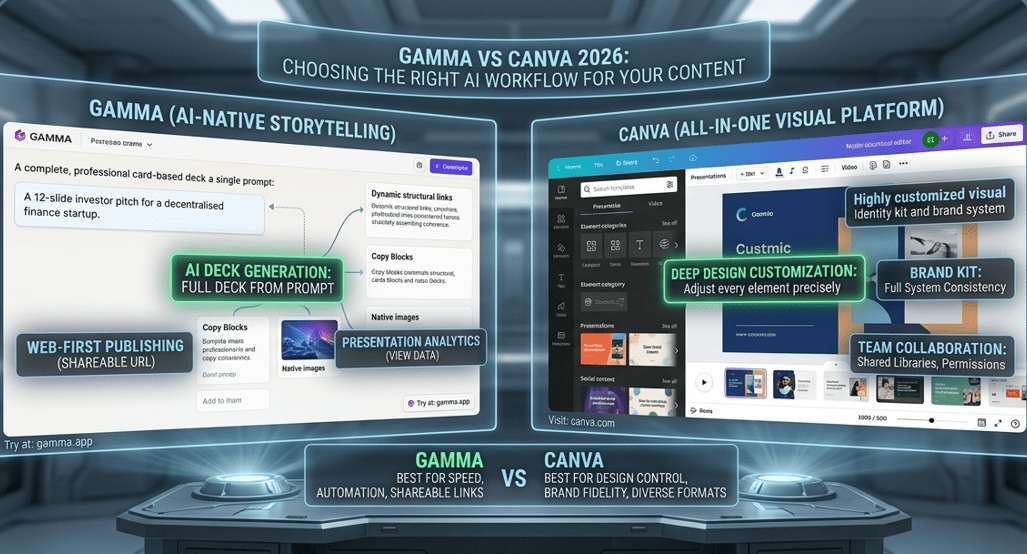
If you’ve spent any time researching AI presentation tools lately, the Gamma vs Canva debate comes up constantly — and for good reason. Both promise to take the pain out of creating slides. Both have invested heavily in AI. But they work in fundamentally different ways, and choosing the wrong one for your workflow will cost you time rather than save it.
This Gamma vs Canva breakdown cuts through the noise so you can make the right call for how you actually work.
What Is Gamma?
Gamma is an AI-native presentation builder that launched publicly in 2023 and has grown fast. The concept behind Gamma is simple: you describe what you want, and the AI builds a complete deck for you — structure, layout, written content, and visuals — in under a minute.
What separates Gamma from traditional slide tools is its card-based, web-first format. Every Gamma presentation lives at a shareable URL. No file attachments, no software required on the viewer’s end. You create it, share a link, done. You can try it directly at gamma.app.
By 2026, Gamma has added a presentation analytics dashboard, improved AI image generation, and a more refined conversational editor. The tool has matured considerably without losing the speed that made it stand out in the first place.
What Is Canva?
Canva has been the default design tool for non-designers since 2013. What started as a drag-and-drop editor has expanded into one of the most comprehensive creative platforms available — covering presentations, video, social content, print, and more.
Over the past two years, Canva has invested seriously in AI. Magic Design generates complete layouts from a prompt. Magic Write handles text generation. An integrated image generator sits inside the editor. For a full breakdown of everything the platform can do, our professional Canva tutorial covers it in depth.
The free tier at canva.com remains one of the most generous in any creative tool category, and it works for the majority of individual users without ever needing an upgrade.
Gamma vs Canva: Core Features at a Glance
Here’s how Gamma vs Canva compare across the features that matter most:
| Feature | Gamma | Canva |
|---|---|---|
| AI Slide Generation | ✅ Full deck from prompt | ⚠️ Layout suggestions only |
| Design Customization | ⚠️ Moderate | ✅ Very deep |
| Template Library | ⚠️ Growing | ✅ Thousands |
| Free Tier | ✅ Limited AI credits | ✅ Very generous |
| Starting Price | ~$8/month | ~$15/month (Pro) |
| Web Publishing | ✅ Default output | ⚠️ Via embed |
| Presentation Analytics | ✅ View and slide data | ❌ Minimal |
| Brand Kit | ⚠️ Basic | ✅ Full brand system |
| Team Collaboration | ✅ Yes | ✅ Very developed |
| Learning Curve | ✅ Very low | ⚠️ Moderate |
Gamma vs Canva: Ease of Use
On speed and simplicity, Gamma wins decisively. You open it, type a topic or paste a rough outline, pick a visual theme, and hit generate. Within thirty seconds you have a complete first draft — slides, structure, copy, and imagery all included. For someone who finds slide design stressful, the Gamma experience genuinely feels like a different category of tool.
Canva requires more effort upfront. The interface is intuitive, but the sheer volume of options — thousands of templates, hundreds of element categories, multiple AI tools spread across the editor — can slow you down until you know where to look. Once you’re comfortable with the workflow it gets fast, but the initial learning curve in the Gamma vs Canva comparison clearly favors Gamma for new users.
Gamma vs Canva: Design Quality and Flexibility
Here Canva takes a clear lead. The level of design control in the Canva editor is simply deeper than what Gamma currently offers. You can adjust every element precisely — fonts, colors, spacing, image treatment, animations, layer order. The brand kit is particularly valuable for teams that need consistent visual output across every asset they produce.
Gamma’s output looks clean and professional, but you’re largely working within the design decisions the AI already made. You can swap colors, change fonts, and restructure cards, but customization is more constrained. For most practical use cases — internal decks, investor pitches, client reports — Gamma’s defaults are more than adequate. But when your work demands a very specific visual identity, Canva wins the Gamma vs Canva design round comfortably.
Gamma vs Canva: AI Capabilities
This is where the Gamma vs Canva comparison gets most interesting. Gamma was designed from day one around AI as its core function. Structure, copy, image selection, layout logic — all flow from a single prompt. The result feels coherent because AI isn’t a feature added on top; it’s what the product is built on.
Canva’s AI tools are capable but operate more independently. Magic Write handles copy, Magic Design handles layout suggestions, and the image generator handles visuals. Each works well individually, but they don’t always feel like parts of a single connected system. Canva is improving this quickly, but Gamma currently delivers the more unified AI creation experience.
If you want to understand how AI can generate structured content with even greater control, our guide on how to use Claude 3.5 Sonnet Artifacts shows a different angle on AI-driven document creation that pairs well with either tool in the Gamma vs Canva matchup.
Gamma vs Canva: Pricing
Both tools offer usable free tiers. Gamma’s free plan provides a limited number of AI credits per month — enough to evaluate the tool properly and produce occasional decks. Paid individual plans start around $8 per month, which makes Gamma noticeably more affordable than Canva Pro.
Canva’s free tier is more generous in terms of features that don’t require AI credits, and most individual users never feel the need to upgrade. Canva Pro, at around $15 per month, adds premium templates, background removal, advanced brand kit tools, and significantly more storage. For teams, Canva for Teams includes shared libraries, admin permissions, and centralized brand management — a more complete organizational offering than Gamma currently provides at this price level.
On pure pricing, Gamma vs Canva goes to Gamma for individuals. For teams with complex brand needs, Canva’s higher price reflects real added value.
Gamma vs Canva: Sharing and Publishing
Gamma has a distinct advantage in how presentations reach their audience. Because every deck is published as a web page by default, sharing means sending a URL — nothing more. The recipient opens a browser, no downloads required, no software to install. Gamma also provides analytics showing how many people opened your deck and how long they spent on each section, which is genuinely useful for sales and client work.
Canva handles sharing through multiple formats: shareable links, PDF downloads, PowerPoint exports, and website embeds. The output flexibility is broader than Gamma’s, which matters if your recipients expect a traditional file format. The trade-off is that analytics are minimal, and the viewer experience varies depending on how they access the content.
Which One Should You Use?
The Gamma vs Canva decision comes down to your workflow, not to which tool is objectively better.
Gamma is the stronger choice if you create presentations regularly and want AI to handle the structural and design work so you can focus entirely on the content. It suits startup founders building pitch decks, consultants producing client reports, educators creating course materials, and anyone who values speed over pixel-perfect control. Gamma integrates naturally into the kind of AI-first productivity stack covered in our best AI tools for productivity guide.
Canva is the better choice if design consistency and brand fidelity are non-negotiable, if you produce a wide variety of visual content beyond presentations, or if your team needs shared assets and proper admin controls. It’s also the stronger tool for social content, which our AI tools for social media growth guide explores further. If budget is a constraint, our roundup of free AI tools for content creators shows how Canva anchors a capable zero-cost creative stack.
In practice, many professionals land on a combined approach: use Gamma to generate a solid first draft, then refine the final version in Canva to match brand standards. It’s a workflow worth trying before committing to just one side of the Gamma vs Canva divide.
Final Thoughts
The Gamma vs Canva question doesn’t have a single correct answer. Gamma is faster, more AI-native, and better suited to generating and publishing presentations directly to the web. Canva is deeper, more flexible, and better for teams that need design consistency across a wide range of formats.
Both tools are moving quickly. Whichever you evaluated six months ago may be meaningfully different today — the Gamma vs Canva gap in AI capabilities has narrowed considerably in 2026, and both are worth a fresh look.
If you’re building a broader AI toolkit beyond presentations, our guide on best AI digital brain tools covers the tools that connect your creative work into a more organized, lasting knowledge system.
Start with the free tier of whichever appeals to you. You’ll know within an hour which side of the Gamma vs Canva debate you belong on — and that’s a faster answer than any comparison article can give you.