
Most people stumble onto Perplexity AI looking for a smarter way to search the web and quickly realize it’s something more than that. It’s not a search engine in the traditional sense, and it’s not a general-purpose chatbot either. It sits in its own category — a research assistant that pulls from live web sources, cites everything it uses, and gives you direct answers instead of a list of links to click through.
This guide shows you exactly how to use Perplexity AI effectively in 2026, from the basics of getting started to the advanced features that make it genuinely useful for research, professional work, and everyday questions.
What Is Perplexity AI?
Perplexity AI is an AI-powered answer engine built on top of large language models with real-time web search capabilities. You ask a question, it searches the web, synthesizes the most relevant information from multiple sources, and gives you a direct, cited answer — all in seconds. Unlike a standard search engine, you don’t have to evaluate ten different links to piece together an answer. Unlike a standard chatbot, it doesn’t rely solely on training data; it pulls current information from the live web on every query.
Launched in 2022, Perplexity AI has grown into one of the most widely used AI research tools available, with a particularly strong following among researchers, journalists, students, and professionals who need accurate, verifiable information quickly. You can access it directly at perplexity.ai. If you want to understand how it compares to competing search-focused AI tools, our Perplexity vs SearchGPT comparison gives you a detailed side-by-side breakdown.
Setting Up
Getting started with Perplexity AI requires no setup. You can use it immediately without creating an account — just go to the website, type your question, and get an answer. Creating a free account unlocks conversation history, saved searches, and a small daily allocation of Pro features.
The interface is intentionally simple. There’s a search bar at the center of the screen, a few mode options above it, and that’s it. The platform removes the friction that makes other research tools slow to adopt. Within two minutes of landing on the page for the first time, most users are already getting useful answers.
The mobile app — available for iOS and Android — mirrors the desktop experience closely and adds a voice input option that works well for quick questions on the go.
How Perplexity AI Works
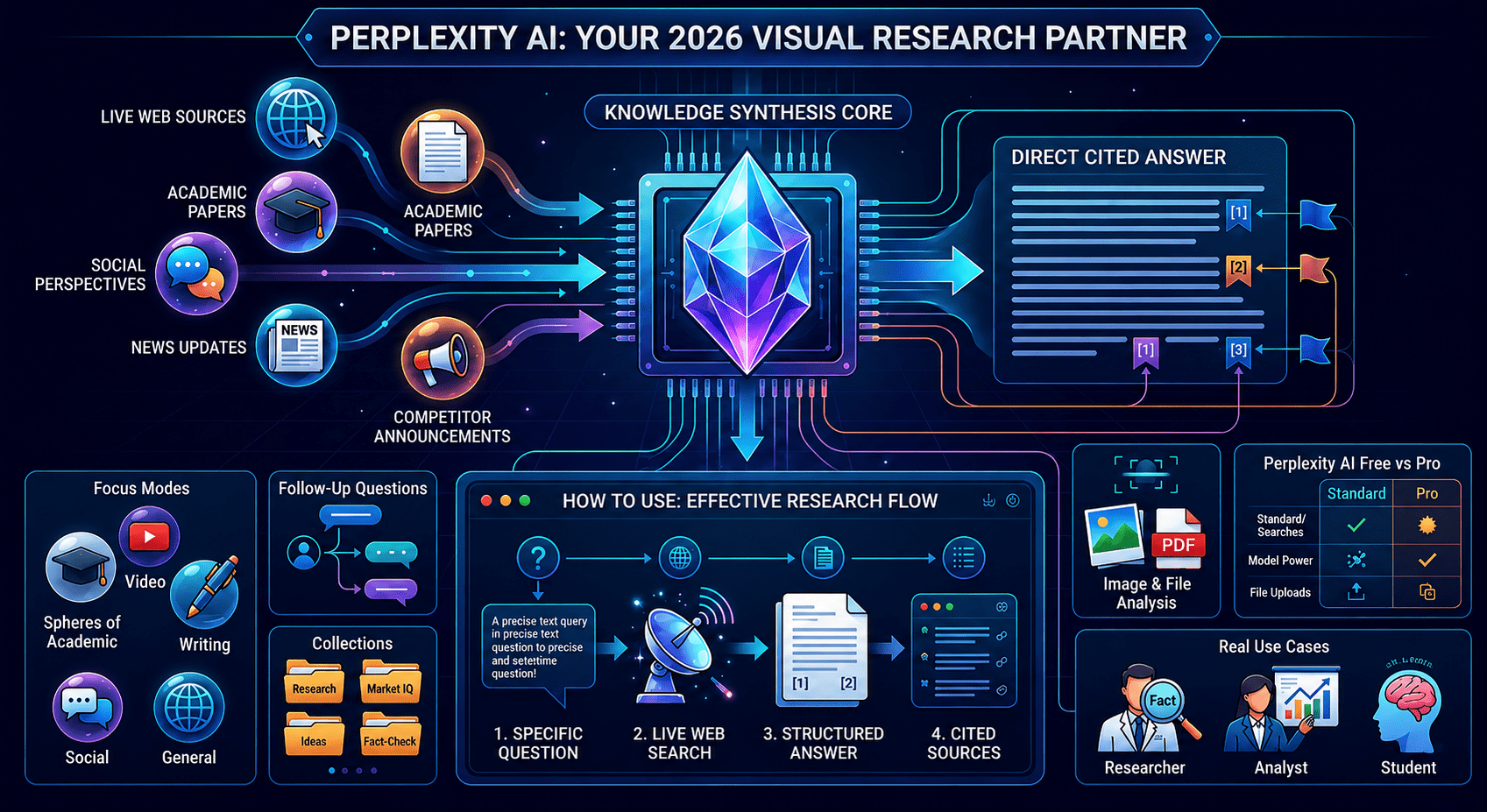
When you submit a query, Perplexity AI runs a live web search, pulls content from multiple relevant sources, and uses a language model to synthesize those sources into a coherent, structured answer. Every factual claim in the response is linked to the source it came from — you can click any citation to go directly to the original article, paper, or page.
This source-grounded approach is what separates it from general chatbots. The model isn’t drawing on training data alone; it works with current web content, which means answers reflect what’s true now rather than what was true when the model was trained. For time-sensitive topics — recent news, current prices, ongoing research — it has a structural advantage over any tool that doesn’t search the web in real time.
For a broader look at where Perplexity AI fits in the AI search landscape alongside other tools, our roundup of best AI search tools in 2026 covers the category in detail.
Key Features Worth Using
Focus Modes
Perplexity AI offers several search modes that change where and how it looks for information. The default “All” mode searches across the general web. “Academic” mode filters for peer-reviewed papers and scholarly sources — valuable for research tasks that require citable, high-quality references. “Writing” mode deprioritizes sources and focuses on generating clean prose. “Video” and “Social” modes pull from YouTube and Reddit respectively, useful when you want community perspectives or video explanations rather than article summaries.
Switching between these modes is something most new users overlook, and it meaningfully changes the quality of results for specific types of queries.
Follow-Up Questions
After delivering an initial answer, the tool suggests several follow-up questions at the bottom of the response. These aren’t generic — they’re contextually generated based on what you just asked. They’re a useful nudge for going deeper into a topic without having to figure out the right follow-up yourself.
You can also type your own follow-up directly in the same thread. The platform maintains the context of the conversation, so follow-up questions build on what was already discussed rather than starting fresh each time.
Collections
Perplexity AI lets you save searches and responses into Collections — organized folders for your research. If you’re working on a project that requires multiple research sessions, Collections let you build a structured archive of what you’ve found without losing track of sources. It’s a simple feature that becomes genuinely useful when you’re doing sustained research over days or weeks.
Image and File Analysis
The platform supports image uploads — you can drop in a photo, screenshot, chart, or diagram and ask questions about it. The same applies to PDF documents. This makes it useful not just as a search tool but as a document analysis companion for quickly extracting information from uploaded files.
Perplexity AI Free vs Pro
The free tier is genuinely useful and sufficient for most casual users. It gives you unlimited standard searches with web citations and a limited number of Pro searches per day.
Perplexity AI Pro, available through their subscription page, costs $20 per month and unlocks unlimited Pro searches, access to more powerful underlying models, higher file upload limits, and API access. The most noticeable difference in practice is the quality and depth of answers on complex queries — Pro searches use more capable models and retrieve more sources per query.
For anyone using it as a regular research tool rather than occasionally, the Pro tier is worth the cost. For light users, the free tier handles most everyday needs without issue.
Perplexity AI vs Other AI Research Tools
Here’s how it compares to the tools most commonly used for similar research tasks:
| Feature | Perplexity AI | ChatGPT | Google Search | NotebookLM |
|---|---|---|---|---|
| Live Web Search | ✅ Always | ⚠️ Paid only | ✅ Yes | ❌ No |
| Source Citations | ✅ Always | ⚠️ Inconsistent | ✅ Links only | ✅ Always |
| Academic Mode | ✅ Yes | ❌ No | ❌ No | ❌ No |
| Private Doc Analysis | ⚠️ Limited | ✅ Yes | ❌ No | ✅ Excellent |
| Free Tier | ✅ Generous | ✅ Limited | ✅ Free | ✅ Yes |
| Conversation Context | ✅ Yes | ✅ Yes | ❌ No | ✅ Yes |
Real Use Cases
Research and Fact-Checking
Perplexity AI is one of the fastest ways to verify a claim or build a research base on a new topic. Because every answer comes with clickable citations, you can trace any statement back to its source in seconds. For journalists, analysts, or anyone who needs to confirm information before using it, that traceability is more practical than copy-pasting answers from a chatbot and hoping they’re accurate.
For document-heavy research where you’re working with your own uploaded files rather than the open web, pairing it with a tool like NotebookLM gives you the best of both worlds. Our NotebookLM guide explains how that tool works alongside web-based research assistants.
Competitive and Market Research
The platform is well-suited for rapid competitive intelligence. You can ask it to summarize what a competitor has announced recently, pull recent news about an industry, or compile a quick overview of a market — and get a sourced, structured answer in the time it would take to open five browser tabs. For teams building systematic research processes, our post on autonomous AI research agents covers how to scale this kind of work further.
Learning New Topics Quickly
One of the most practical everyday uses of Perplexity AI is getting up to speed on an unfamiliar subject. The combination of synthesized explanation and cited sources means you’re not just getting a summary — you’re getting a map of where to go deeper if you need to.
Tips to Get More Out of It
Ask specific questions. The tool performs better with precise, concrete queries than with vague ones. “What are the main differences between fixed and variable rate mortgages for first-time buyers in 2026?” will get you a more useful answer than “tell me about mortgages.”
Use Academic mode for research. If you’re working on anything that requires credible, peer-reviewed sources, switching to Academic mode before you search filters out lower-quality content and keeps results within scholarly publications.
Build a research thread. Rather than starting new searches for every related question, use the follow-up feature to build a single connected thread on the same topic. Context accumulates across the thread, so answers get progressively more useful.
Save everything useful. Use Collections to organize research by project. Building a well-organized collection library is worth the two extra seconds per search. This kind of structured knowledge management connects well with the approach covered in our guide on building a sovereign AI personal knowledge system.
Final Thoughts
Perplexity AI has earned its position as one of the most genuinely useful AI tools available in 2026. It doesn’t try to do everything — it focuses on answering questions accurately with verifiable sources, and it does that better than most alternatives.
For anyone spending significant time searching for reliable information online, it’s worth making a daily habit. The free tier is enough to start, and the paid tier justifies itself the moment usage becomes regular. If you’re building a wider AI toolkit around it, our guide on best AI tools for productivity shows where Perplexity AI fits alongside everything else in a well-rounded workflow.