
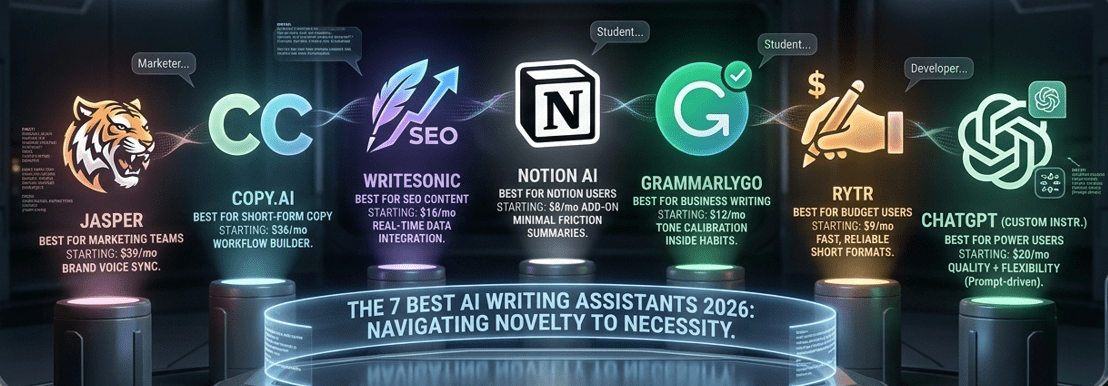
AI writing assistants have gone from novelty to necessity in the space of two years. In 2026, the category is crowded enough that choosing badly costs you real time and money — and the differences between tools are significant enough that the wrong pick for your workflow can actually slow you down rather than speed you up.
This guide covers the 7 best AI writing assistants available right now, what each one does well, where each one falls short, and who each one is actually built for. No filler, just what you need to make a clear decision.
Who Are AI Writing Assistants For?
AI writing assistants aren’t just for professional writers. The best ones in 2026 serve a genuinely wide range of users: marketers producing content at scale, solo founders who can’t afford a copywriter, developers writing technical documentation, HR teams drafting job descriptions, and students working on research summaries.
The common thread is that all of these people spend meaningful time turning thoughts into written words — and AI writing assistants compress that process significantly. If writing takes up more than two hours of your week, there’s almost certainly an AI writing assistant that can give at least one of those hours back. Our post on free AI tools for content creators covers several zero-cost options if budget is a starting constraint.
What Separates Good AI Writing Assistants From Average Ones
Not all AI writing assistants are created equal, and the gap between the best and the mediocre ones is wider than most comparison articles admit. The tools that consistently perform well share a few qualities: they produce output that doesn’t immediately read as AI-generated, they integrate into existing workflows without forcing you to change how you work, they handle context well enough that you don’t have to repeat yourself constantly, and they give you enough control to actually shape the output rather than just accept whatever the model generates.
The tools that disappoint tend to produce generic, repetitive content that requires more editing than writing from scratch would have taken. In 2026, that’s no longer an acceptable standard — the best AI writing assistants have raised the bar considerably.
The 7 Best AI Writing Assistants in 2026
1. Jasper
Jasper remains one of the most capable AI writing assistants for marketing and long-form content. It’s built specifically for commercial writing use cases — blog posts, ad copy, email sequences, landing pages — and the quality of its output in those areas is consistently above what general-purpose models produce when used without specific prompting.
The Brand Voice feature is where Jasper earns its price tag. You can train it on your existing content and it adjusts tone, vocabulary, and style to match — which makes it genuinely useful for teams producing content at scale. The integration with jasper.ai and its native browser extension mean you can use it inside Google Docs, WordPress, or any web-based editor without switching tabs.
Jasper is more expensive than most AI writing assistants, with plans starting around $39 per month. It’s worth it for teams publishing regularly. For solo creators on a budget, the cost is harder to justify. If you’re building a broader productivity stack, our AI tools for productivity guide shows how Jasper fits alongside other tools.
2. Copy.ai
Copy.ai started as a short-form copy tool and has evolved into one of the more well-rounded AI writing assistants in the market. Its strongest area remains exactly what the name suggests — copy. Product descriptions, social captions, email subject lines, CTAs, ad headlines — Copy.ai generates multiple variations quickly, which makes it particularly useful for A/B testing.
The 2026 version adds a workflow builder that lets you chain copy tasks together, so you can generate a full social media content calendar from a single brief. If you’re managing content across platforms, that’s a meaningful time-saver. Our guide on AI tools for social media growth shows how Copy.ai fits into a broader social content workflow.
3. Writesonic
Writesonic sits in an interesting position among AI writing assistants — it combines content generation with SEO optimization in a way that most competing tools don’t. The built-in integration with real-time search data means it can write blog posts that reference current information, not just content from training data.
For content teams focused on organic traffic, that’s a significant advantage. Writesonic also offers one of the better article generation workflows in the category: you provide a keyword, it suggests titles and outlines, you select what you want, and it builds the full draft. You can explore the tool at writesonic.com. Pricing starts around $16 per month, which makes it one of the better-value AI writing assistants for SEO-focused content work.
4. Notion AI
Notion AI deserves a spot on any list of AI writing assistants, but with an important caveat: it’s not a standalone writing tool. It’s an assistant embedded inside Notion’s workspace, which means it works best if you already live in Notion.
For those who do, Notion AI is remarkably practical. It can summarize meeting notes, draft action items, rewrite sections of documents, translate content, and generate first drafts — all without leaving the workspace where your other work already lives. The friction is minimal because context is already there. If you’re using Notion to manage projects and want to add AI writing capabilities without adopting a new platform, this is the most logical choice. Our guide on how to build automated AI workflows covers how Notion AI fits into larger automated systems.
5. GrammarlyGO
GrammarlyGO is the AI writing assistant that fits most naturally into existing habits because Grammarly itself is already installed in most professionals’ browsers. GrammarlyGO extends the familiar grammar-checking interface into active writing assistance — generating drafts, adjusting tone, rewriting paragraphs, and shortening or expanding content on request.
What GrammarlyGO does particularly well is tone calibration. It understands context well enough to distinguish between a message to a colleague and a proposal to a client, and it adjusts output accordingly. For business writing — emails, proposals, reports, internal communications — it’s one of the most consistently reliable AI writing assistants available. The fact that it works inside Gmail, Google Docs, LinkedIn, Slack, and most other web-based platforms without any additional setup is a genuine advantage.
6. Rytr
Rytr is the budget pick among AI writing assistants, and it punches above its weight for the price. The free tier is usable — not just a teaser — and the paid plan starts at $9 per month, making it one of the most affordable options in the category.
Output quality is lower than Jasper or Writesonic for complex content, but for shorter formats — social captions, email introductions, product blurbs, simple blog outlines — Rytr is fast and reliable. For freelancers or small business owners who need AI writing assistance without a significant monthly commitment, it’s a sensible starting point.
7. ChatGPT (with custom instructions)
ChatGPT deserves an honest mention among the best AI writing assistants in 2026, not as a default recommendation but as the most flexible option in the category when used correctly. With well-structured custom instructions and a clear system prompt, ChatGPT can match or exceed the output quality of dedicated writing tools across most content types.
The trade-off is setup time and prompting knowledge. Jasper or Writesonic give you a structured workflow out of the box. ChatGPT requires you to build that structure yourself. For users who invest in learning how to prompt well, the combination of quality, flexibility, and value is hard to beat. For users who want to start generating useful output immediately, the dedicated AI writing assistants above will serve better.
Gamma vs Canva: A Quick Comparison
Here’s how these AI writing assistants stack up across the criteria that matter most:
| Tool | Best For | Starting Price | Free Tier | SEO Features |
|---|---|---|---|---|
| Jasper | Marketing teams | $39/month | ❌ Trial only | ⚠️ Basic |
| Copy.ai | Short-form copy | $36/month | ✅ Yes | ⚠️ Limited |
| Writesonic | SEO content | $16/month | ✅ Yes | ✅ Strong |
| Notion AI | Notion users | $8/month add-on | ⚠️ Limited | ❌ No |
| GrammarlyGO | Business writing | $12/month | ✅ Yes | ❌ No |
| Rytr | Budget users | $9/month | ✅ Generous | ⚠️ Basic |
| ChatGPT | Power users | $20/month | ✅ Yes | ⚠️ With plugins |
Which AI Writing Assistant Should You Choose?
The honest answer is that the best AI writing assistants aren’t interchangeable, and picking one based on a top-10 list without matching it to your specific use case is how people end up disappointed.
If you produce blog content aimed at SEO, Writesonic is the most direct fit. If you run a marketing team with brand consistency requirements, Jasper earns its higher price. If you want AI writing assistance without leaving your existing tools, GrammarlyGO or Notion AI are the most frictionless options. If budget is the primary constraint, start with Rytr’s free tier and upgrade only when you hit its limits.
It’s also worth thinking about how AI writing assistants fit into your broader research workflow. For people who combine writing with heavy document research, pairing one of these tools with a source-grounded research assistant like the one covered in our NotebookLM guide creates a more complete workflow than either tool delivers alone.
Final Thoughts
The market for AI writing assistants has matured significantly. In 2026, the question isn’t whether these tools can help you — they clearly can — but which one slots cleanly into how you already work.
Start with a free tier, stress-test it with your actual writing tasks, and judge it on the output it produces for your specific use cases rather than on feature lists. If you’re building a wider AI toolkit beyond writing, our guide on best AI tools for data analytics covers the tools that complement a strong content workflow with data-driven decision making.
The right AI writing assistant won’t feel like a tool you use. It’ll feel like a habit you keep.