
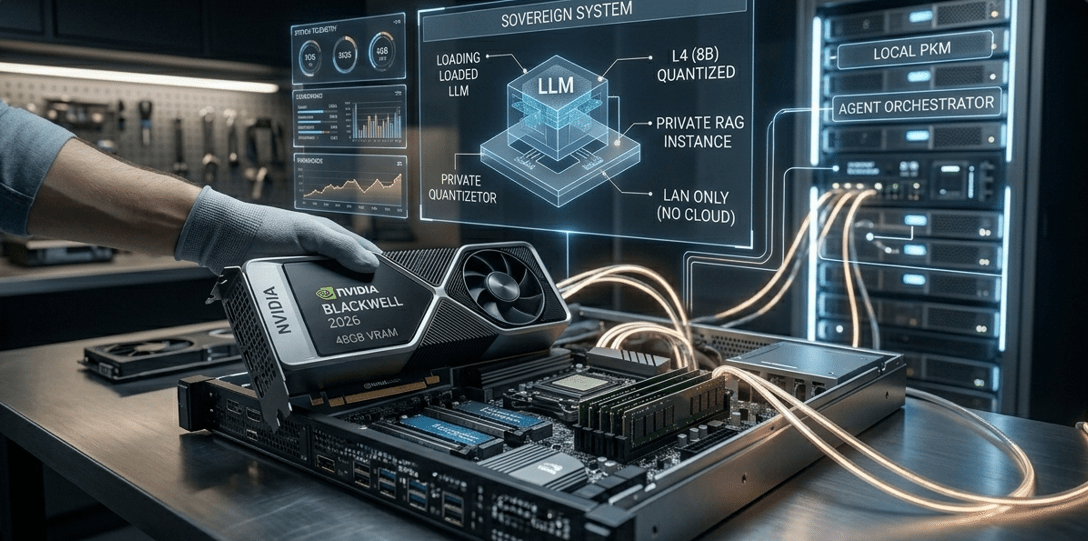
The digital landscape of 2026 has brought us incredible convenience, but it has also triggered a massive realization: our data is the new gold, and we’ve been giving it away for free to the “big tech” cloud giants for far too long. If you’ve been following the latest tech trends, you know that privacy isn’t just a luxury anymore; it’s a necessity for survival in a world of pervasive data harvesting. That is why the decision to build a private AI server 2026 has become the go-to project for developers, small business owners, and privacy enthusiasts alike.
Think about it: why run your sensitive queries through a third-party server when you can have the same (or better) power sitting right next to your desk? Setting up your own local infrastructure allows you to process confidential documents, experiment with uncensored models, and maintain 100% uptime without worrying about subscription price hikes or random API outages. In this tutorial, I’m going to walk you through everything you need to know to build a private AI server 2026 from scratch. We will cover the hardware, the software stack, and the fine-tuning of your local models to ensure you have a truly sovereign system.
The Motivation Behind Local AI Infrastructure
In 2026, the gap between massive cloud-based models and local models has shrunk significantly. We are now seeing “Small Language Models” (SLMs) that can outperform the giants of 2024 while running on consumer-grade hardware. When you build a private AI server 2026, you are essentially creating a sovereign digital fortress for your thoughts and data.
Many users are realizing that simple tools found in the 7 best AI privacy guard tools 2026 guide are just the beginning of a larger journey. To truly protect your intellectual property, you need to go beyond software filters and actually own the hardware that processes your data. Whether you’re managing sensitive client information or personal research, local execution ensures that your prompts never leave your local area network (LAN). This is the cornerstone of what it means to build a private AI server 2026.
Phase 1: Hardware Selection for Your 2026 Server
The heart of your project to build a private AI server 2026 is the Graphics Processing Unit (GPU). In 2026, VRAM (Video RAM) is the most critical metric you need to track. If you don’t have enough VRAM, your models will run at a snail’s pace on your CPU, or they won’t run at all. It’s the difference between instant answers and waiting five minutes for a sentence.
For a mid-range setup this year, you should be looking at the latest NVIDIA Blackwell or high-end RTX 50-series cards. You need at least 24GB of VRAM to run a highly capable 70B parameter model with decent quantization. If you’re on a tighter budget, even a used 3090 or 4090 can still do wonders in 2026. To ensure you aren’t bottlenecking your system, I highly recommend cross-referencing our list of the best hardware for local AI 2026. Selecting the right parts is 70% of the battle when you build a private AI server 2026.
Hardware Comparison for Private Servers
To help you budget and plan your build, here is a quick breakdown of the tiers you can choose from when you decide to build a private AI server 2026.
| Build Tier | Target GPU | Model Capacity |
|---|---|---|
| Entry Level | RTX 4060 Ti (16GB) | 8B – 14B Models |
| Pro Consumer | RTX 5090 (32GB) | 70B Parameters |
| Workstation | Dual A6000 / H100 | 140B+ Mixture of Experts |
Phase 2: Preparing the Operating System
While you can technically build a private AI server 2026 on Windows using WSL2, most professionals prefer a native Linux environment for better stability and lower overhead. Ubuntu 24.04 or later remains the gold standard because of its massive driver support and the sheer volume of community tutorials available.
- Perform a Clean Install: Use a dedicated NVMe SSD to ensure the OS doesn’t slow down during heavy inference tasks.
- Update Your Drivers: Visit the official NVIDIA Driver Page and install the latest Linux headers. This is the “bridge” that allows your AI software to talk to your GPU hardware.
- Install Docker: This is non-negotiable. Docker allows you to run different AI environments in isolated “containers,” preventing the dreaded “dependency hell” where one app breaks another.
If this sounds a bit technical, don’t worry. The ultimate goal to build a private AI server 2026 is to have a “set it and forget it” system. Once the drivers are in, the rest is mostly managed through modern, user-friendly interfaces.
Phase 3: Installing the Local AI Runner
Now comes the fun part: picking the engine that will power your assistant. In 2026, the most user-friendly way to build a private AI server 2026 is by using Ollama. It’s an open-source tool that lets you run models with a simple command line, but it also has a powerful API that connects to dozens of third-party interfaces.
Alternatively, if you prefer a graphical interface right out of the box, you can use LM Studio. It allows you to browse the Hugging Face repository directly, download models, and start chatting in a ChatGPT-like interface immediately. To see which runner fits your specific hardware needs, check out our local AI interface comparison 2026 ultimate guide. Choosing the right software is just as important as the hardware when you build a private AI server 2026.
Phase 4: Choosing Your Models Wisely
When you build a private AI server 2026, you aren’t limited to just one “brain.” You can download and swap dozens of models specialized for different tasks. This is the ultimate freedom of local hosting.
- Llama 4 (8B): Perfect for quick summaries, email drafting, and daily tasks.
- Mistral Next: Incredible for creative writing and logical reasoning.
- DeepSeek Coder: The current gold standard for local programming assistance and debugging.
In 2026, the debate of small language models vs giants 2026 has shown that for most daily productivity, a well-quantized 8B or 14B model is more than enough. You don’t always need a massive enterprise-grade GPU to get elite-level performance if you choose your models wisely while you build a private AI server 2026.
Phase 5: Creating Your “Private Brain”
The true “killer feature” of deciding to build a private AI server 2026 is RAG (Retrieval-Augmented Generation). This allows your AI to “read” your personal files, PDFs, and spreadsheets without them ever being uploaded to the internet. By connecting your server to a tool like AnythingLLM or Obsidian, you can create a sovereign AI PKM private brain.
Imagine asking your local server, “What did I decide in that meeting three months ago regarding the marketing budget?” and having it scan your local transcripts and notes to give you an answer in seconds. This level of utility is why a private server is the ultimate essential AI software 2026 guide move. It turns your server from a chatbot into a personal historian.
Phase 6: Advanced Multi-Agent Orchestration
By mid-2026, we’ve moved past simple “chatting.” When you build a private AI server 2026, you should be looking at running autonomous agents. These are AI programs that can perform multi-step tasks without you having to prompt them every five seconds.
You can actually build your first multi-agent AI team 2026 right on your own hardware. For example, you could have one agent researching a market trend, another agent writing a report based on that research, and a third agent checking for errors. Since it’s all local, it costs you zero dollars in API fees, no matter how many thousands of words they generate. This is the real power move when you build a private AI server 2026.
Security Considerations for Your Local Server
Even though it’s “private,” a server connected to your home network always carries some risk. If you build a private AI server 2026, make sure you aren’t leaving the digital front door wide open. You should follow these basic security steps:
- Implement a Firewall: Ensure that only local IP addresses can access your AI API.
- Use a Secure VPN: If you want to access your server from outside your house, use a secure VPN like Tailscale rather than opening risky ports on your router.
- Regular Updates: AI software is moving fast. Regularly update your drivers and model runners to patch any security vulnerabilities that might appear.
Security is a core part of the broader AI cybersecurity tools 2026 landscape. A private server that isn’t secured is just a local data leak waiting to happen, so take this part seriously as you build a private AI server 2026.
Power Consumption and Long-Term Maintenance
A common question when people decide to build a private AI server 2026 is: “How much is this going to cost me in electricity?”
High-end GPUs can draw significant power when they are actively “thinking.” However, by 2026, we have much better “sleep” modes and efficiency curves than we did in the past. Most home servers only pull significant power when you are actively running a query. For maintenance, just make sure you have good airflow and keep the case clean. AI workloads generate a lot of heat, and a dusty GPU is a slow GPU. It’s a small price to pay for the freedom you get when you build a private AI server 2026.
Training vs. Inference: Know the Difference
Most people who build a private AI server 2026 are doing it for inference (running existing models). However, you might also want to do some light fine-tuning. If you want to “teach” your AI your specific writing style or your company’s brand voice, you should look into our train local AI model guide 2026 privacy tutorial. Fine-tuning requires more VRAM and a bit more patience, but the results are incredibly personalized and powerful.
The Role of Local Runners in 2026
The software you use to run your models has evolved tremendously. In the early days, you needed to be a computer scientist to use these tools. Now, the best local LLM runners 2026 provide one-click installations that handle the complex math of quantization (shrinking models to fit your RAM) automatically.
When you build a private AI server 2026, these runners act as the “brain stem” of your entire operation. They ensure that whether you are using a Mac with M4 chips or a PC with a high-end NVIDIA card, the experience remains smooth and the output remains top-tier.
Why “Build” Instead of “Buy” an AI PC?
You might see pre-built “AI PCs” for sale in 2026. While these are convenient, they often come with a massive markup and locked-down hardware. When you choose to build a private AI server 2026 yourself, you know exactly what is inside. You can upgrade the RAM, swap the GPU as new tech comes out, and change the operating system whenever you want. This DIY approach is the only way to ensure true, long-term data sovereignty.
Troubleshooting Common Build Issues
If you decide to build a private AI server 2026, you might run into a few common hiccups during the setup process:
- “Out of Memory” (OOM) Errors: This usually means you’re trying to run a model that is too big for your VRAM. The solution is to try a smaller version or a more “quantized” (shrunken) version of the model.
- Sluggish Generation: Check if your server is accidentally using your CPU instead of your GPU. This is almost always a driver or CUDA configuration issue.
- Connection Refused: Double-check your local network settings and ensure your firewall isn’t blocking the local port (usually 11434 for Ollama).
Scaling Your Server for the Future
As your needs grow, your server can grow too. You can build a private AI server 2026 that starts with one GPU and eventually expands to three or four cards to serve your whole family or a small business team. This allows you to provide an “Internal ChatGPT” for your employees without the risk of sensitive company trade secrets being used to train public models.
Final Thoughts on Your AI Journey
Deciding to build a private AI server 2026 is more than just a fun tech project; it’s a declaration of independence in the digital age. It’s about taking back control of your digital life and ensuring that your most valuable asset—your information—remains yours and yours alone.
The barrier to entry has never been lower than it is right now. Hardware is more efficient, software is more intuitive, and the open-source models are more capable than ever before. If you follow this guide, you’ll have a world-class AI assistant living right in your home, working for you 24/7, with zero monthly fees and total privacy.
For more tips on how to optimize your local setup, don’t miss our best local LLM runners 2026 comparison. The future of AI isn’t just in the cloud; it’s in your living room. Happy building!